Enhancing Digital Landscapes with the Procreate Dead Leaves Single Brush
Digital landscape painting often presents a unique paradox for artists. While software like Procreate offers infinite possibilities for color and composition, achieving organic realism can feel surprisingly difficult. One of the most persistent challenges illustrators face is rendering natural ground cover—specifically, the scattered, textured look of fallen foliage. Hand-painting every individual leaf is not only time-consuming but can often result in repetitive patterns that break the illusion of nature. This is where specialized tools become essential. The Procreate Dead Leaves Single Brush emerges as a targeted solution for artists looking to streamline their workflow while adding authentic texture to their digital art and nature landscapes.
Creating believable environments requires more than just broad strokes of green and brown. It demands attention to the small details that signal reality to the viewer’s eye: the crunch of autumn underfoot, the decay of winter, or the fresh scatter of spring blooms. For many digital painters, these micro-details are the difference between a flat illustration and an immersive scene. By integrating the Procreate Dead Leaves Single Brush into your toolkit, you address the need for efficiency without sacrificing the organic irregularity that defines natural settings.
The Challenge of Organic Textures in Digital Art
When painting landscapes, artists frequently struggle with the "stamp" effect. Using standard shape brushes to create foliage often results in uniform, cookie-cutter leaves that look artificial. To counter this, painters might spend hours manually adjusting opacity, rotation, and size for each element. This process is not only tedious but can lead to creative fatigue, causing artists to skip important details altogether. The goal is to achieve a sense of randomness and depth, which is inherently difficult to replicate with manual precision.
Furthermore, layer management becomes a nightmare when dealing with complex ground textures. Adding hundreds of individual leaf elements can bloat file sizes and slow down performance on iPads. Artists need a method that allows for rapid application of texture while maintaining control over density and placement. The Procreate Dead Leaves Single Brush is designed specifically to mitigate these issues, offering a balance between speed and artistic control.
How the Dead Leaves Brush Transforms Your Workflow
The primary advantage of using the Procreate Dead Leaves Single Brush lies in its ability to simulate natural scattering with minimal effort. Unlike multi-stamp brushes that spray clusters of leaves indiscriminately, a single brush approach allows for deliberate placement. This is crucial for composition. You decide exactly where the pile of leaves accumulates against a tree root or how they drift across a forest path. This level of intentionality helps maintain the narrative focus of your artwork.
This tool is particularly effective for adding grass and foliage to your digital art. While it is named for dead leaves, its utility extends to various types of ground cover. By adjusting the brush size and opacity, you can create everything from a thick carpet of autumn decay to sparse, wind-blown scraps on a rocky outcrop. The brush interacts naturally with Procreate’s pressure sensitivity, allowing for dynamic variation in stroke weight. A light touch yields delicate, translucent leaves, while heavier pressure creates bold, opaque shapes that anchor the foreground.
Practical Applications for Different Art Styles
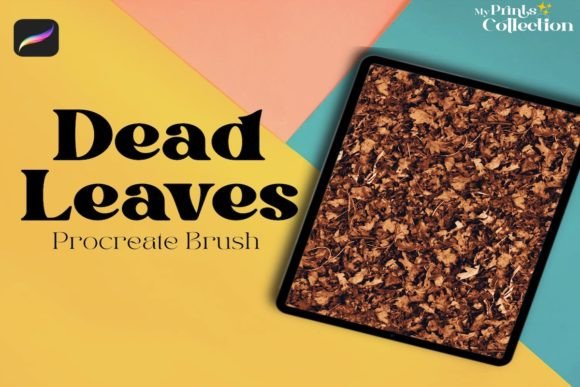
Different artists will approach the Procreate Dead Leaves Single Brush based on their specific stylistic goals. For realistic landscape painters, this brush serves as a foundational texturing tool. It can be used to block in the general shape of leaf litter before refining with finer details. By layering multiple passes with varying colors—ochres, burnt siennas, and deep umbers—you can build up a rich, complex surface that mimics the depth of real forest floors.
For concept artists and illustrators working in a more stylized or semi-realistic manner, the brush offers a quick way to establish mood. A few well-placed strokes can suggest a seasonal change or the passage of time without overwhelming the viewer with detail. In character illustrations, adding subtle leaf elements around a subject’s feet can help ground them in the environment, preventing the common issue of characters appearing to float above the background.
Even matte painters and environment designers can benefit from this resource. When creating large-scale backgrounds, efficiency is key. The Procreate Dead Leaves Single Brush allows for rapid iteration of terrain textures. You can quickly test different distributions of foliage to see what best guides the viewer’s eye through the scene. This iterative process is much faster when you have a reliable, high-quality brush at your disposal.
Technical Specifications and Compatibility
Understanding the technical requirements ensures a smooth integration of this tool into your existing setup. The Procreate Dead Leaves Single Brush is delivered as a .brushset file, which is the native format for Procreate brushes. It is important to note that this product is exclusively designed for the Procreate app. It is not compatible with Adobe Photoshop, Illustrator, or other raster graphics software. This specialization allows the brush to leverage Procreate’s unique engine features, such as tilt sensitivity and streamline stabilization, which contribute to its natural feel.
To use this brush effectively, you must have Procreate App version 5 or higher. Older versions may not support the specific dynamics programmed into the brush, leading to inconsistent results. Once purchased, you will receive a download link for a zip file sized at approximately 1 MB. This compact size ensures quick downloads even on slower connections. Inside the zip file, you will find the .brushset file ready for import. As this is a Digital Product, no physical item will be shipped, making it an instant resource for your creative library.
Tips for Maximizing Results
To get the most out of the Procreate Dead Leaves Single Brush, consider experimenting with layer blending modes. Placing leaf layers on "Multiply" can help them integrate seamlessly with underlying textures, such as dirt or moss. Conversely, using "Overlay" or "Soft Light" can add highlights and warmth, simulating sunlight filtering through canopy gaps. Color variation is also key; avoid using a single flat color. Instead, sample colors directly from your landscape palette to ensure the leaves harmonize with the overall lighting conditions of your piece.
Another useful technique is to combine the dead leaves brush with custom alpha locks. By painting a rough shape of a leaf pile on a new layer and enabling Alpha Lock, you can then use the brush to fill that shape with texture. This contains the foliage within specific boundaries, giving you clean edges while maintaining internal complexity. This method is particularly helpful for creating distinct patches of vegetation in structured garden scenes or urban environments where nature is reclaiming man-made structures.
Conclusion
In the realm of digital landscape painting, the right tools can significantly elevate the quality of your work while reducing production time. The Procreate Dead Leaves Single Brush offers a practical, efficient solution for one of the most tedious aspects of environment design: rendering natural ground cover. By providing a realistic, versatile, and easy-to-use tool, it empowers artists to focus more on composition and storytelling rather than getting bogged down in repetitive detailing. Whether you are a hobbyist looking to improve your nature sketches or a professional illustrator seeking to streamline your workflow, this brush provides the organic touch needed to bring your digital landscapes to life.